 FileFlow
A FILEFLOW GUIDE
Johnny.Decimal on Mac
Give your files a place. Keep the next decision clear.
A place you can name.
Johnny.Decimal is a way to organize information into numbered areas, categories, and IDs, with an index to help you find it again. An area groups related categories; a category contains IDs for particular subjects. In a filesystem, an ID can name a folder containing several related files. You do not need a new number for every PDF.
20-29 Work/
  21 Projects/
    21.01 Project Documents/
      Project kickoff.txt
      Meeting notes.txt
Delivery checklist.txt20-29Area- Work is the broad grouping.
21Category- Projects sits within Work.
21.01ID- Project Documents is one location for related files.
The names give the numbers meaning. In this example, 21.01 identifies the folder, not a date, a priority, or a single document.
Read the official introductionStart with a structure. Make it useful.
FileFlow can initialize a built-in starting structure based on Johnny.Decimal. This is FileFlow's template, not an official Johnny.Decimal product. The small sample library shown here illustrates the method; it is not the complete built-in template. Choose names and groupings that reflect the work you actually do.
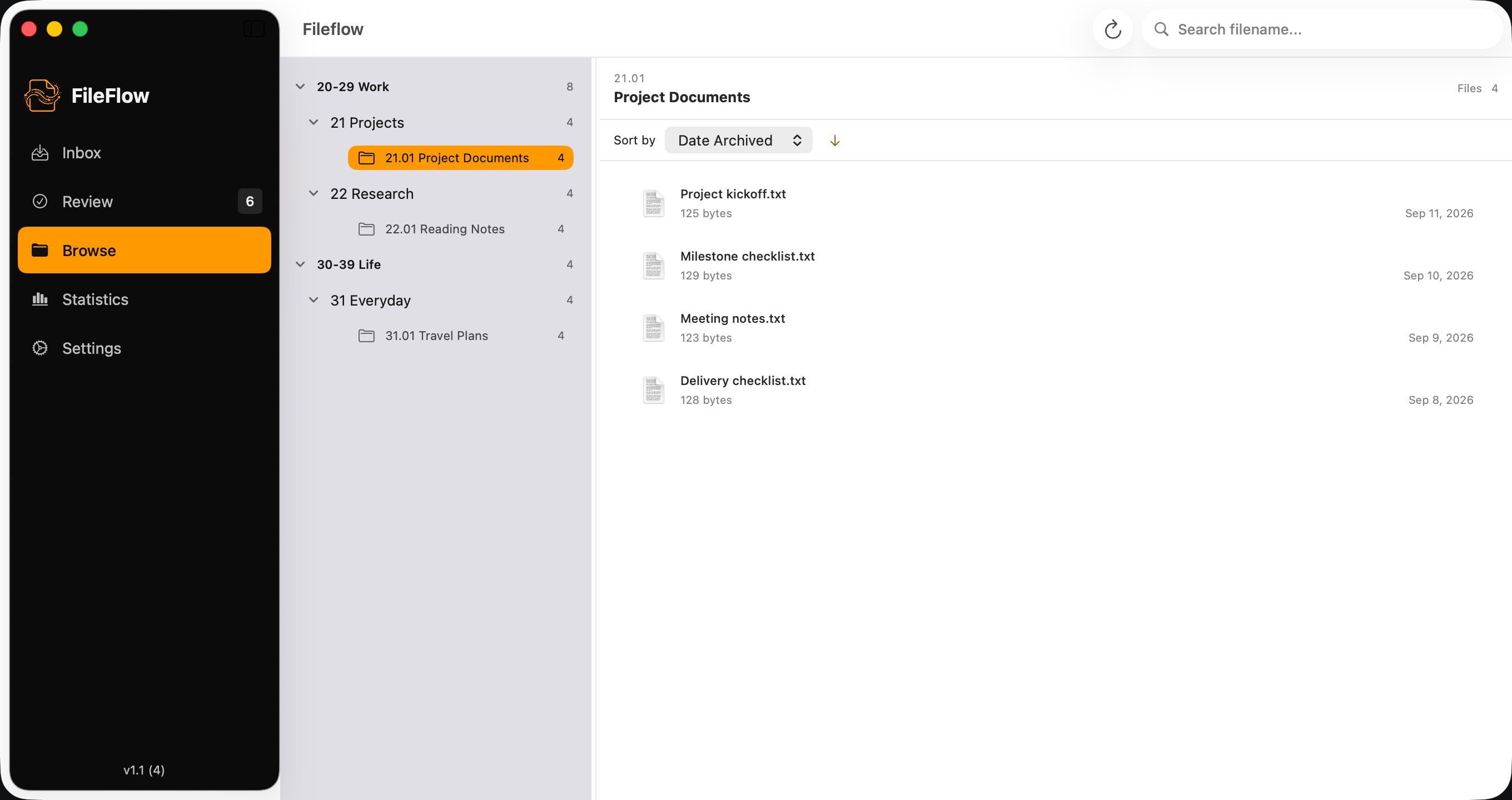
FileFlow keeps an operational index for its library. This does not imply synchronization with an external Johnny.Decimal index or note-taking app.
Then, handle the files that arrive.
A directory gives a file a possible home. You still need to decide whether it belongs there. FileFlow brings that decision and the proposed file operation into a Mac workspace, with a plan to review before execution.
Choose a small starting point.
Use separate test source and archive folders with disposable file copies. During setup, choose the template or an existing structure, check the selected path, and authorize the folders. Initialization may create folders and FileFlow metadata; it is separate from organizing source files.
Choose where a file belongs.
Scan the source folder in Inbox. Select a sample file, choose Archive to..., pick its destination, and confirm. The manual path does not require an AI provider.
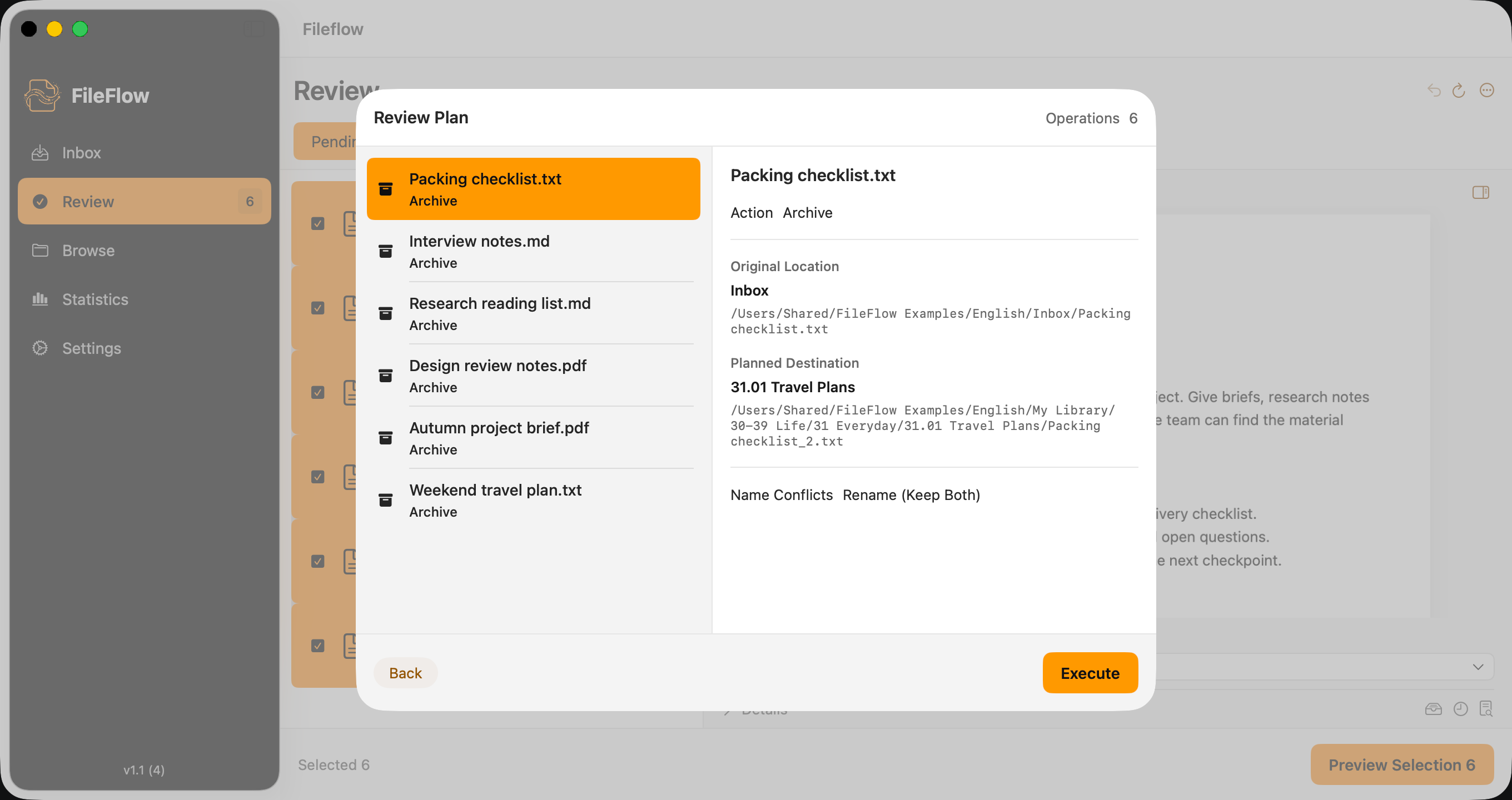
Read the plan before you execute.
In Review Plan, check the full source and destination paths and the name-conflict policy. Back returns without running the plan. Choose Execute only when the plan is right. Avoid overwriting files in your first trial.
Check the result.
Read the operation results and open the actual destination files. An activity record alone is not proof that every file is intact. Keep independent backups: Undo cannot restore the old contents of an overwritten file.
Keep what already works.
Numbered locations are useful when you repeatedly return to the same subjects and want a consistent way to refer to them. They take some thought to set up and maintain. If your current folders already make sense, FileFlow can use an existing structure instead. You do not need to reorganize an entire disk, adopt every part of the method, or configure AI to try the manual workflow.
Choose the tool that fits.
Prefer the terminal? Johnny.Decimal offers its own official JD CLI. It lets you navigate by ID or name and create a missing ID folder from a configured JDex entry when the parent category folder exists. You can use it directly in your shell; an AI assistant is not required. See the official guide for setup and current capabilities.
Prefer a visual Mac workspace? FileFlow brings folder browsing, file selection, and plan review into an app. Its manual workflow needs neither a terminal nor an AI assistant. Choose the approach that suits the way you work.
Learn the method. Try the workflow.
The official documentation explains the wider Johnny.Decimal system, including its index and practices beyond folders. This page is a FileFlow walkthrough, not a replacement for that documentation. For your first run, our step-by-step guide starts with three disposable file copies.
Johnny.Decimal is a trademark of Coruscade Pty Ltd, Australia. FileFlow is an independent product and is not affiliated with or endorsed by Johnny.Decimal. The examples on this page are FileFlow examples, not official Johnny.Decimal templates or redistributed paid content.
Back to FileFlow